Running Several Containers Together with Docker Compose
◢ This post is also available in: 日本語
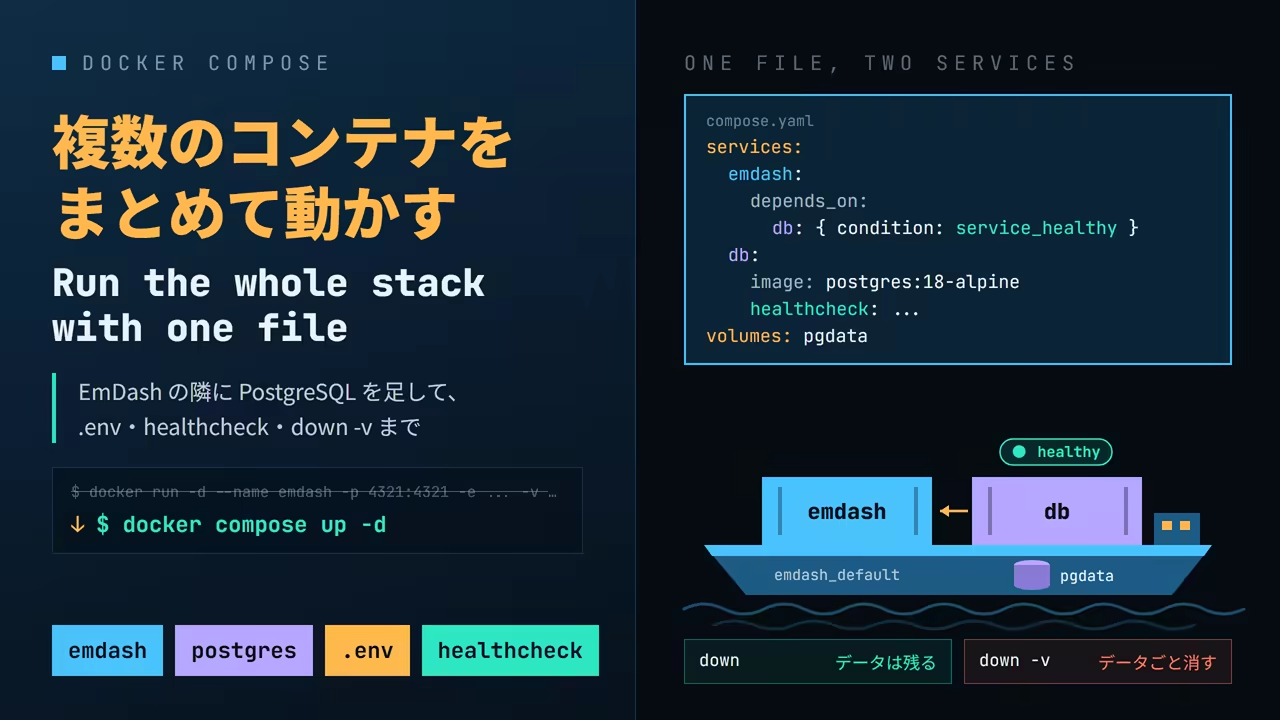
Where the last post left off
Last time EmDash was built from its official Dockerfile and started
like this.
❯ docker volume create emdash-data
emdash-data
❯ docker volume create emdash-uploads
emdash-uploads
❯ docker run -d --name emdash -p 4321:4321 -e EMDASH_ENCRYPTION_KEY=emdash_enc_v1_... \
    -v emdash-data:/app/data -v emdash-uploads:/app/uploads emdash
88254b6d6c18065376170dd50289e3b110739f69ccf369048dd64835c9ff4193It works, but nobody types that line every time. It ends up in a note somewhere, to be copied
and pasted. And the moment the database moves into a container of its own, there are two
docker run lines, one more to create a network, and an agreement about which starts first to
keep in your head.
Docker Compose writes all of that down in one configuration file and runs it with a single
docker compose up. This post starts from the compose.yaml that ships in EmDash's repository,
replaces the last post's docker run with it, and then adds PostgreSQL so two containers run
together.
Everything here was checked on Docker Desktop (Engine 29.8.0, Compose v5.5.1). Compose comes with
Docker Desktop, as the docker compose subcommand.
Reading compose.yaml
EmDash's repository has a compose.yaml at the top.
services:
  emdash:
    build: .
    ports:
      - "4321:4321"
    volumes:
      - emdash-data:/app/data
      - emdash-uploads:/app/uploads
    restart: unless-stopped

volumes:
  emdash-data:
  emdash-uploads:
Each entry under services is the blueprint for a container. There is one service here,
named emdash. Set next to the last post's docker run, it maps almost one to one.
docker run / docker volume | compose.yaml |
|---|---|
docker build -t emdash ., then run emdash | build: . (built during up) |
-p 4321:4321 | ports: ["4321:4321"] |
-e KEY=value | environment: |
-v emdash-data:/app/data | volumes: (under the service) |
docker volume create emdash-data | volumes: (top level) |
--restart unless-stopped | restart: unless-stopped |
--name emdash | the service name emdash (Compose names the container; see below) |
-d | docker compose up -d |
restart: unless-stopped is an option the last post did not use. When the container dies, or
Docker itself restarts, the engine starts the container again, unless you stopped it yourself.
That matters later.
Bringing it up
In the directory with compose.yaml, run docker compose up -d. The -d means the same as in
docker run -d: run in the background.
❯ docker compose up -d
 Image emdash-emdash Building
...
#19 [deps 10/10] RUN pnpm install --frozen-lockfile
#19 CACHED
#20 [build 1/8] COPY . .
#20 DONE 210.3s
...
#23 [build 4/8] RUN pnpm build && pnpm --filter @emdash-cms/template-blog build
#23 DONE 982.7s
#24 [build 5/8] RUN NODE_OPTIONS=--max-old-space-size=4096 pnpm --filter @emdash-cms/template-blog deploy /deploy --prod --legacy
#24 DONE 157.6s
...
 Image emdash-emdash Built
 Network emdash_default Creating
 Volume emdash_emdash-uploads Creating
 Volume emdash_emdash-data Creating
 Volume emdash_emdash-data Created
 Volume emdash_emdash-uploads Created
 Network emdash_default Created
 Container emdash-emdash-1 Creating
 Container emdash-emdash-1 Created
 Container emdash-emdash-1 Starting
Container emdash-emdash-1 StartedBecause of build: ., it builds the image first. That is the last post's docker build
unchanged, and pnpm install in [deps 10/10] is CACHED: the image has a different name, but
the build cache is shared inside the same engine. Everything from COPY . . down ran again all
the same, and the whole thing took 27 and a half minutes.
Once the build is done, it creates a network, the volumes and the container, in that order, and
starts it. Under docker run you named each of those yourself; here Compose names them. Look at
them with docker compose ps and docker compose logs.
❯ docker compose ps
NAME              IMAGE           COMMAND                   SERVICE   CREATED          STATUS          PORTS
emdash-emdash-1   emdash-emdash   "docker-entrypoint.s…"   emdash    33 seconds ago   Up 29 seconds   0.0.0.0:4321->4321/tcp, [::]:4321->4321/tcp
❯ docker compose logs
emdash-1  | 22:26:18 [@astrojs/node] Server listening on
emdash-1  |   local: http://localhost:4321
emdash-1 | network: http://172.18.0.2:4321These are docker ps and docker logs, limited to the services in compose.yaml. Each line of
logs starts with the service that printed it, which pays off once there is more than one: all
the logs in one place.
The network: address has moved from last time's 172.17.0.2 to 172.18.0.2. Compose creates
a network of its own for each project (emdash_default) and attaches the containers to it. That
matters when PostgreSQL arrives.
The old post is gone
Now open the post written last time.
❯ curl -s -o /dev/null -w '%{http_code}\n' http://localhost:4321/posts/hello-from-a-container
302
❯ curl -s -o /dev/null -w '%{http_code} %{redirect_url}\n' http://localhost:4321/_emdash/admin/
302 http://localhost:4321/_emdash/admin/setupNo post, and the admin sends you to the setup wizard. This is a brand-new EmDash. The post
and the account were supposed to be in the emdash-data volume. The volume list shows why they
are not.
❯ docker volume ls
DRIVER    VOLUME NAME
local     emdash-data
local     emdash-uploads
local     emdash_emdash-data
local emdash_emdash-uploadsThere is a new, empty volume called emdash_emdash-data. Compose puts the project name in
front of the names in compose.yaml when it creates volumes and networks. By default the
project name is the name of the directory holding compose.yaml, here emdash. Every name in
the output above follows from that rule.
| Thing | Name in compose.yaml | Actual name |
|---|---|---|
| Image | emdash (the service) | emdash-emdash |
| Container | emdash (the service) | emdash-emdash-1 |
| Network | (not written) | emdash_default |
| Volume | emdash-data | emdash_emdash-data |
The prefix keeps common names like db or data from colliding when several projects run on
one machine. That is useful, but if you meant to use a volume created earlier with docker run,
Compose quietly creates a new, empty one instead, as it did here. No error, no warning.
Using an existing volume
For a volume created outside compose.yaml, add external: true. It says "Compose does not
create this; one with this name already exists".
 volumes:
   emdash-data:
+    external: true
   emdash-uploads:
+    external: true
Remove the container with docker compose down, then bring it up again.
❯ docker compose down
 Container emdash-emdash-1 Stopping
 Container emdash-emdash-1 Stopped
 Container emdash-emdash-1 Removing
 Container emdash-emdash-1 Removed
 Network emdash_default Removing
 Network emdash_default Removed
❯ docker compose up -d
time="2026-09-24T07:27:37+09:00" level=warning msg="volume \"emdash_emdash-data\" carries the compose label \"emdash-data\" but does not match the compose file (using \"emdash-data\"); it is left untouched — remove it manually if it is no longer needed"
time="2026-09-24T07:27:37+09:00" level=warning msg="volume \"emdash_emdash-uploads\" carries the compose label \"emdash-uploads\" but does not match the compose file (using \"emdash-uploads\"); it is left untouched — remove it manually if it is no longer needed"
 Network emdash_default Creating
 Network emdash_default Created
 Container emdash-emdash-1 Creating
 Container emdash-emdash-1 Created
 Container emdash-emdash-1 Starting
 Container emdash-emdash-1 Started
❯ curl -s -o /dev/null -w '%{http_code}\n' http://localhost:4321/posts/hello-from-a-container
200No build this time, since the image already exists; it was up in 3.3 seconds. And the old post
comes back with 200. The admin now sends you to the login page rather than to setup.
The warnings are about the two emdash_emdash-* volumes created by mistake a moment ago: they no
longer match anything in compose.yaml, Compose leaves them alone, and removing them is up to
you. They are empty, so remove them.
❯ docker volume rm emdash_emdash-data emdash_emdash-uploads
emdash_emdash-data
emdash_emdash-uploadsSecrets go in .env
The last post's docker run had -e EMDASH_ENCRYPTION_KEY=...; the shipped compose.yaml does
not. EmDash runs without it, but saving a plugin secret fails.
Last time the key came from the CLI inside the image, through docker run --rm emdash ....
Compose has the same thing: docker compose run --rm SERVICE COMMAND starts a throwaway
container with the service's settings (image, volumes, network).
❯ docker compose run --rm emdash node_modules/.bin/emdash secrets generate
 Container emdash-emdash-run-a1715c69eafa Creating
 Container emdash-emdash-run-a1715c69eafa Created
emdash_enc_v1_...

EmDash encryption key generated.

Set EMDASH_ENCRYPTION_KEY in your environment.
For Cloudflare deployments, push it to your Worker's secrets.
For Node deployments, add it to your process environment or .env file.

Keep this value secret. Losing it means losing every secret encrypted with it.Written straight into compose.yaml, the key would go into the repository the moment
compose.yaml is committed. Put it in a file called .env next to compose.yaml instead.
EMDASH_ENCRYPTION_KEY=emdash_enc_v1_...In compose.yaml, write ${NAME} where the value would go.
services:
  emdash:
    environment:
      EMDASH_ENCRYPTION_KEY: ${EMDASH_ENCRYPTION_KEY}
When Compose reads compose.yaml, it also reads the .env in the same directory and replaces
each ${...}. docker compose config shows the result.
❯ docker compose config
...
    environment:
      EMDASH_ENCRYPTION_KEY: emdash_enc_v1_...
...It is masked here, but the real output prints the key in full. Mind that before pasting
config output into an issue or a chat.
On the next up -d, Compose recreates only the service whose configuration changed.
❯ docker compose up -d
 Container emdash-emdash-1 Recreate
 Container emdash-emdash-1 Recreated
 Container emdash-emdash-1 Starting
Container emdash-emdash-1 StartedEmDash's .gitignore already lists .env.
Adding PostgreSQL
This is where Compose earns its keep. EmDash runs on SQLite here, but it also supports PostgreSQL. The database moves into its own container, and the two containers run together.
First, switch EmDash itself to PostgreSQL. In the blog template's astro.config.mjs, follow the
example in EmDash's documentation.
-import { sqlite } from "emdash/db";
+import { postgres } from "emdash/db";
...
-			database: sqlite({ url: "file:./data.db" }),
+			database: postgres({ connectionString: process.env.DATABASE_URL }),
Then add a service called db to compose.yaml. The image is postgres:18-alpine, the one from
the first post.
services:
  emdash:
    build: .
    ports:
      - "4321:4321"
    environment:
      EMDASH_ENCRYPTION_KEY: ${EMDASH_ENCRYPTION_KEY}
      DATABASE_URL: postgres://emdash:${POSTGRES_PASSWORD}@db:5432/emdash
    volumes:
      - emdash-uploads:/app/uploads
    depends_on:
      - db
    restart: unless-stopped

  db:
    image: postgres:18-alpine
    environment:
      POSTGRES_USER: emdash
      POSTGRES_PASSWORD: ${POSTGRES_PASSWORD}
      POSTGRES_DB: emdash
    volumes:
      - pgdata:/var/lib/postgresql

volumes:
  emdash-uploads:
    external: true
  pgdata:
Three things to notice.
- The host in
DATABASE_URLisdb. On the network Compose creates, a service's name is its host name. There is no IP address to look up dbhas noports. The only thing talking to PostgreSQL is EmDash on the same network, so there is no reason to publish it to the hostdepends_on: [db]says "startemdashafterdb"
The PostgreSQL password gets its own line in .env. The pgdata volume is not external, so
Compose creates it, as emdash_pgdata.
The configuration changed, so the image has to be rebuilt. up does not build when the image
already exists, so add --build.
❯ docker compose up -d --build
...
#19 [deps 10/10] RUN pnpm install --frozen-lockfile
#19 DONE 215.7s
...
 Image emdash-emdash Built
 Network emdash_default Creating
 Volume emdash_pgdata Creating
 Volume emdash_pgdata Created
 Network emdash_default Created
 Container emdash-db-1 Creating
 Container emdash-db-1 Created
 Container emdash-emdash-1 Creating
 Container emdash-emdash-1 Created
 Container emdash-db-1 Starting
 Container emdash-db-1 Started
 Container emdash-emdash-1 Starting
 Container emdash-emdash-1 Started
❯ docker compose ps
NAME              IMAGE                COMMAND                   SERVICE   CREATED          STATUS          PORTS
emdash-db-1       postgres:18-alpine   "docker-entrypoint.s…"   db        32 seconds ago   Up 30 seconds   5432/tcp
emdash-emdash-1 emdash-emdash "docker-entrypoint.s…" emdash 30 seconds ago Up 29 seconds 0.0.0.0:4321->4321/tcp, [::]:4321->4321/tcpThe last post shows up right away. The edited astro.config.mjs is under templates/, which the
deps stage copies with COPY templates/ templates/. So pnpm install was not CACHED this
time and took three and a half minutes again.
db started first and emdash second: the depends_on order. The PORTS column for db is
just 5432/tcp, with no ->: it is not published to the host.
Both are Up. Yet every page returns 500. Two traps followed.
pg cannot be found
❯ docker compose logs emdash
...
emdash-1 | 22:48:15 [ERROR] Error [ERR_MODULE_NOT_FOUND]: Cannot find package 'pg' imported from /app/dist/server/chunks/dialect_CjqOFQB3.mjspg is the package Node uses to talk to PostgreSQL. It is among EmDash's dependencies, so it
ought to be in the image. docker compose exec is the Compose version of docker exec, and
takes a service name rather than a container name. Listing the top of node_modules inside the
container and looking for pg gave this.
@astrojs @emdash-cms astro emdash kysely react react-dom
ls: cannot access 'node_modules/pg': No such file or directory
It is not at the top, but it is further down, in pnpm's own store under
node_modules/.pnpm/node_modules/. And the kysely at the top is a link into that store.
❯ docker compose exec emdash sh -c 'ls -d node_modules/.pnpm/node_modules/pg node_modules/.pnpm/node_modules/kysely; readlink node_modules/kysely'
node_modules/.pnpm/node_modules/kysely
node_modules/.pnpm/node_modules/pg
/app/node_modules/.pnpm/node_modules/kyselyThe built server asks Node for pg by name, and Node only finds it at the top of
node_modules. The runtime stage of the Dockerfile read last time already has a line linking
kysely for the same reason; pg was left out. On SQLite nothing uses pg, which is why
nobody noticed.
The fix is to link pg in the same line.
 RUN mkdir -p data uploads \
-    && ln -s /app/node_modules/.pnpm/node_modules/kysely /app/node_modules/kysely
+    && ln -s /app/node_modules/.pnpm/node_modules/kysely /app/node_modules/kysely \
+    && ln -s /app/node_modules/.pnpm/node_modules/pg /app/node_modules/pg
This went upstream as PR #3406. Review pointed out that the libSQL driver cannot be found for the same reason, so the PR links that one too.
DATABASE_URL is not read
With pg found, the next error was this.
❯ docker compose logs emdash
...
emdash-1 | 22:49:26 [ERROR] Error: connect ECONNREFUSED 127.0.0.1:5432127.0.0.1 is the container itself. DATABASE_URL says db, and that is not where it looked.
The variable is set (the password masked with sed).
❯ docker compose exec emdash sh -c 'printenv DATABASE_URL | sed "s#//emdash:[^@]*@#//emdash:***@#"'
postgres://emdash:***@db:5432/emdashThe cause was inside the built server.
❯ docker compose exec emdash sh -c 'grep -n -A8 "\"database\": {" dist/server/chunks/config_B4S-UmlO.mjs'
3:	"database": {
4-		"entrypoint": "emdash/db/postgres",
5-		"config": {},
6-		"type": "postgres",
..."config": {}. The process.env.DATABASE_URL in astro.config.mjs is evaluated when the
image is built, not when the container starts, and the result is baked into the server.
DATABASE_URL is empty during the build, so the baked configuration is empty too, and nothing
passed to the container is ever read.
With an empty configuration, pg falls back to the environment variables PGHOST, PGUSER,
PGPASSWORD and PGDATABASE (a convention shared by PostgreSQL clients). Those are read at run
time, so changing the environment in compose.yaml fixes it without a rebuild.
     environment:
       EMDASH_ENCRYPTION_KEY: ${EMDASH_ENCRYPTION_KEY}
-      DATABASE_URL: postgres://emdash:${POSTGRES_PASSWORD}@db:5432/emdash
+      PGHOST: db
+      PGUSER: emdash
+      PGPASSWORD: ${POSTGRES_PASSWORD}
+      PGDATABASE: emdash
The Dockerfile changed, so rebuild with --build and bring it up. The environment in
compose.yaml changed as well, so emdash is recreated (Recreate).
❯ docker compose up -d --build
...
#30 [stage-3 4/4] RUN mkdir -p data uploads     && ln -s /app/node_modules/.pnpm/node_modules/kysely /app/node_modules/kysely     && ln -s /app/node_modules/.pnpm/node_modules/pg /app/node_modules/pg
#30 DONE 1.3s
...
 Image emdash-emdash Built
 Container emdash-emdash-1 Recreate
 Container emdash-emdash-1 Recreated
 Container emdash-db-1 Starting
 Container emdash-db-1 Started
 Container emdash-emdash-1 Starting
Container emdash-emdash-1 StartedNow it finally runs.
❯ curl -s -o /dev/null -w '%{http_code} %{redirect_url}\n' http://localhost:4321/_emdash/admin/
302 http://localhost:4321/_emdash/admin/setup
❯ docker compose exec db psql -U emdash -c "\dt"
                           List of tables
 Schema |                   Name                   | Type  | Owner
--------+------------------------------------------+-------+--------
 public | _emdash_404_log                          | table | emdash
 public | _emdash_api_tokens                       | table | emdash
 public | _emdash_authorization_codes              | table | emdash
...EmDash has created 61 tables in PostgreSQL. docker compose exec db psql runs the psql inside
the db container, so there is no PostgreSQL client to install on the host.
Started is not the same as ready
With that working, empty the database and bring everything up again. docker compose down -v
removes the volumes along with the containers (more on that later).
❯ docker compose down -v
 Container emdash-emdash-1 Stopping
 Container emdash-emdash-1 Stopped
 Container emdash-emdash-1 Removing
 Container emdash-emdash-1 Removed
 Container emdash-db-1 Stopping
 Container emdash-db-1 Stopped
 Container emdash-db-1 Removing
 Container emdash-db-1 Removed
 Volume emdash_pgdata Removing
 Network emdash_default Removing
 Volume emdash_pgdata Removed
 Network emdash_default Removed
❯ docker compose up -d
 Network emdash_default Creating
 Volume emdash_pgdata Creating
 Volume emdash_pgdata Created
 Network emdash_default Created
 Container emdash-db-1 Creating
 Container emdash-db-1 Created
 Container emdash-emdash-1 Creating
 Container emdash-emdash-1 Created
 Container emdash-db-1 Starting
 Container emdash-db-1 Started
 Container emdash-emdash-1 Starting
Container emdash-emdash-1 StartedVolume emdash_pgdata Removed takes the database away, and up creates a new, empty volume.
emdash starts after db, so the order holds. The logs fill with errors all the same. Here is
docker compose logs --timestamps, with the key lines picked out in time order.
db-1      | 2026-09-24T13:17:26.718167900Z The files belonging to this database system will be owned by user "postgres".
emdash-1  | 2026-09-24T13:17:28.192456500Z 13:17:28 [@astrojs/node] Server listening on
emdash-1  | 2026-09-24T13:17:29.941842900Z EmDash middleware error: Error: connect ECONNREFUSED 172.18.0.2:5432
emdash-1  | 2026-09-24T13:17:31.029192400Z EmDash middleware error: Error: Database initialization is backing off after a recent migration failure: connect ECONNREFUSED 172.18.0.2:5432
db-1      | 2026-09-24T13:17:31.959476600Z 2026-09-24 13:17:31.959 UTC [1] LOG:  database system is ready to accept connections
...
emdash-1  | 2026-09-24T13:18:05.968293800Z Auto-seeded default collections
(During initialisation db starts once internally and stops again, so ready to accept connections actually appears twice. The one shown is the second, real one.)
depends_on waits until the db container has started, not until PostgreSQL accepts
connections. A PostgreSQL started on an empty volume first spends about five seconds creating
its database. A request in that window made EmDash fail to connect and back off after the
failure. It then logged the backing off error 28 times, and only started using the database
34 seconds after PostgreSQL was ready.
And throughout, the admin page answered curl with status 200 (a healthy one gives a 302 to
setup). Watching status codes alone, you would not see that anything was broken.
Waiting for "ready to use" rather than "started" is what a healthcheck is for. Give db a
command that checks whether it is usable, and make emdash's depends_on wait until db is
healthy.
     depends_on:
-      - db
+      db:
+        condition: service_healthy
     restart: unless-stopped

   db:
     image: postgres:18-alpine
     ...
+    healthcheck:
+      test: ["CMD", "pg_isready", "-U", "emdash"]
+      interval: 2s
+      retries: 15
pg_isready ships with PostgreSQL and checks only whether it accepts connections. This runs it
every two seconds, up to 15 times. Empty the database once more and bring it up. This time
down removes the containers first, then down -v removes the volume left behind (down -v
removes just the volumes when there are no containers).
❯ docker compose down
 Container emdash-emdash-1 Stopping
 Container emdash-emdash-1 Stopped
 Container emdash-emdash-1 Removing
 Container emdash-emdash-1 Removed
 Container emdash-db-1 Stopping
 Container emdash-db-1 Stopped
 Container emdash-db-1 Removing
 Container emdash-db-1 Removed
 Network emdash_default Removing
 Network emdash_default Removed
❯ docker compose down -v
 Volume emdash_pgdata Removing
 Volume emdash_pgdata Removed
❯ docker compose up -d
 Network emdash_default Creating
 Volume emdash_pgdata Creating
 Volume emdash_pgdata Created
 Network emdash_default Created
 Container emdash-db-1 Creating
 Container emdash-db-1 Created
 Container emdash-emdash-1 Creating
 Container emdash-emdash-1 Created
 Container emdash-db-1 Starting
 Container emdash-db-1 Started
 Container emdash-db-1 Waiting
 Container emdash-db-1 Healthy
 Container emdash-emdash-1 Starting
Container emdash-emdash-1 Startedup printed two more lines: Waiting and Healthy. This time emdash started after PostgreSQL was accepting connections,
and not a single error was logged. Here are both starts on the same time axis.
Pick a start with the buttons and move through it with the slider. Times are measured, in seconds from when PostgreSQL began initialising.
- 1.47 s EmDash starts listening
- 3.22 s First request. The database refuses it (ECONNREFUSED)
- 5.24 s PostgreSQL starts accepting connections
- 39.25 s EmDash finally uses the database, after 28 backing-off errors
22.25 s: PostgreSQL is accepting connections, EmDash is listening. A request gets: error page
Writing a post, then removing it
To check that the data really lives in PostgreSQL, write a post.
After the setup wizard at http://localhost:4321/_emdash/admin/, write it with the CLI inside the
image rather than the admin. emdash login logs in with a device flow you approve in the browser.
❯ docker compose exec emdash node_modules/.bin/emdash login --url http://localhost:4321
◐ Connecting to http://localhost:4321...
(node:27) ExperimentalWarning: SQLite is an experimental feature and might change at any time
(Use `node --trace-warnings ...` to show where the warning was created)
✔ Connected to EmDash

ℹ Open your browser to:
  http://localhost:4321/_emdash/admin/device

ℹ Enter code: A74A-6BWW

◐ Waiting for authorization...
✔ Logged in as ... (admin)
ℹ Token saved to path:/appEnter the code in the browser and approve it, and the CLI is logged in. The post comes from
emdash content create, with the body as JSON in EmDash's format (Portable Text).
❯ docker compose exec emdash node_modules/.bin/emdash content create posts --slug hello-from-postgresql --data '{"title":"Hello from PostgreSQL","content":[{"_type":"block","style":"normal","_key":"b0","children":[{"_type":"span","_key":"s0","text":"This post was written through Docker Compose. Its data lives in PostgreSQL, in a volume."}]}]}'
{
  "id": "01M39XTRVAJCD7PBS8K6N1K7P4",
  "type": "posts",
  "slug": "hello-from-postgresql",
  "status": "published",
...
❯ curl -s -o /dev/null -w '%{http_code}\n' http://localhost:4321/posts/hello-from-postgresql
200down keeps the data
docker compose down removes the containers and the network.
❯ docker compose down
 Container emdash-emdash-1 Stopping
 Container emdash-emdash-1 Stopped
 Container emdash-emdash-1 Removing
 Container emdash-emdash-1 Removed
 Container emdash-db-1 Stopping
 Container emdash-db-1 Stopped
 Container emdash-db-1 Removing
 Container emdash-db-1 Removed
 Network emdash_default Removing
 Network emdash_default Removed
❯ docker compose up -d
 Network emdash_default Creating
 Network emdash_default Created
 Container emdash-db-1 Creating
 Container emdash-db-1 Created
 Container emdash-emdash-1 Creating
 Container emdash-emdash-1 Created
 Container emdash-db-1 Starting
 Container emdash-db-1 Started
 Container emdash-db-1 Waiting
 Container emdash-db-1 Healthy
 Container emdash-emdash-1 Starting
 Container emdash-emdash-1 Started
❯ curl -s -o /dev/null -w '%{http_code}\n' http://localhost:4321/posts/hello-from-postgresql
200It stops things in the reverse of the start order: emdash first, then db, so the database
never disappears from under something using it. Coming back up there are no Volume lines: the
volume survived, so there was nothing to create. The post is still there with 200. The
containers are gone, but the data is in the emdash_pgdata volume.
down -v takes the data too
With -v, the volumes go as well.
❯ docker compose down -v
 Container emdash-emdash-1 Stopping
 Container emdash-emdash-1 Stopped
 Container emdash-emdash-1 Removing
 Container emdash-emdash-1 Removed
 Container emdash-db-1 Stopping
 Container emdash-db-1 Stopped
 Container emdash-db-1 Removing
 Container emdash-db-1 Removed
 Volume emdash_pgdata Removing
 Network emdash_default Removing
 Volume emdash_pgdata Removed
 Network emdash_default Removed
❯ docker volume ls
DRIVER    VOLUME NAME
local     emdash-data
local     emdash-uploads
❯ docker compose up -d
 Network emdash_default Creating
 Volume emdash_pgdata Creating
 Volume emdash_pgdata Created
 Network emdash_default Created
 Container emdash-db-1 Creating
 Container emdash-db-1 Created
 Container emdash-emdash-1 Creating
 Container emdash-emdash-1 Created
 Container emdash-db-1 Starting
 Container emdash-db-1 Started
 Container emdash-db-1 Waiting
 Container emdash-db-1 Healthy
 Container emdash-emdash-1 Starting
 Container emdash-emdash-1 Started
❯ curl -s -o /dev/null -w '%{http_code}\n' http://localhost:4321/posts/hello-from-postgresql
302This time up starts with Volume emdash_pgdata Creating: a new, empty volume. The post is
gone, EmDash is back at setup, and the ec_posts table had zero rows. The external
volumes emdash-data and emdash-uploads, on the other hand, are still there. Compose removes
what Compose created, and leaves alone what it did not. Marking them external at the start
was the right call in this sense too.
The figure below lets you try what stop, start, down and down -v each leave behind, with
the output Compose actually printed.
Press a command to see what of the project stays and what goes. Below is what Compose printed for it.
- emdash-db-1Up
- emdash-emdash-1Up
- emdash_defaultnetwork
- emdash_pgdatavolumeHello from PostgreSQL
- emdash-uploadsexternalvolume
- emdash-emdashimage
Two containers are running, and the post Hello from PostgreSQL is in emdash_pgdata
stop only stops the containers, and start carries on from there. The difference between
docker stop and docker rm in the first post is exactly the difference between stop and
down. And down -v goes all the way to the first post's docker volume rm in one go. Handy
when you want a fresh database during development; with production data, there is no undo.
When Docker itself restarts
Last, restart: unless-stopped. The shipped compose.yaml has it on emdash only, and the db
added here did not have it.
Docker Desktop once crashed and restarted in the middle of an image build. Afterwards things looked like this.
❯ docker ps -a --format '{{.Names}} {{.Status}}' | grep emdash
emdash-emdash-1 Up 44 seconds
emdash-db-1 Exited (255) 46 seconds ago
emdash Exited (137) 3 days ago
emdash-check Exited (137) 4 days agoThe last two are containers from the previous post and do not matter here. Only emdash, which
has restart, came back; db stayed down. EmDash running on its own, without its database, can
do nothing. Give db the same line.
   db:
     image: postgres:18-alpine
+    restart: unless-stopped
On up -d, only db, whose configuration changed, is recreated.
❯ docker compose up -d
 Container emdash-emdash-1 Running
 Container emdash-db-1 Recreate
 Container emdash-db-1 Recreated
 Container emdash-db-1 Starting
 Container emdash-db-1 Started
 Container emdash-db-1 Waiting
Container emdash-db-1 HealthyRestarting Docker Desktop in this state, both came back this time.
❯ docker compose ps -a
NAME              IMAGE                COMMAND                   SERVICE   CREATED         STATUS                   PORTS
emdash-db-1       postgres:18-alpine   "docker-entrypoint.s…"   db        5 minutes ago   Up 2 minutes (healthy)   5432/tcp
emdash-emdash-1   emdash-emdash        "docker-entrypoint.s…"   emdash    7 hours ago     Up 2 minutes             0.0.0.0:4321->4321/tcp, [::]:4321->4321/tcp
❯ for c in emdash-db-1 emdash-emdash-1; do docker inspect $c --format '{{.Name}} status={{.State.Status}} restarts={{.RestartCount}} started={{.State.StartedAt}} health={{if .State.Health}}{{.State.Health.Status}}{{end}}'; done
/emdash-db-1 status=running restarts=0 started=2026-09-24T22:01:51.1812861Z health=healthy
/emdash-emdash-1 status=running restarts=0 started=2026-09-24T22:01:51.1818878Z health=Look at the start times. The two containers started together, 0.6 milliseconds apart. Neither
depends_on nor the healthcheck was waited for. Restarting containers under restart is the
Docker engine's job, and the engine knows nothing about the order in compose.yaml.
Nothing went wrong this time. With the database already there, PostgreSQL was ready in half a
second, and EmDash does not connect to the database until the first request arrives. But that was
luck, not Compose protecting anything. Healthchecks only apply when you start things with
docker compose up.
Traps I actually hit
Stopping EmDash always ends in a kill
After docker compose stop, ps -a showed exit code 137. This was recorded before PostgreSQL
was added, with EmDash running on its own.
❯ docker compose stop
 Container emdash-emdash-1 Stopping
 Container emdash-emdash-1 Stopped
❯ docker compose ps -a
NAME              IMAGE           COMMAND                   SERVICE   CREATED          STATUS                      PORTS
emdash-emdash-1 emdash-emdash "docker-entrypoint.s…" emdash 19 seconds ago Exited (137) 1 second ago137 is 128 + 9: killed by SIGKILL. stop first sends SIGTERM (a request to exit), and
SIGKILL if that does not end it. To see, I sent SIGTERM alone with
docker kill -s TERM emdash-emdash-1 and timed how long the container took to stop.
❯ s=$(date +%s%N); docker kill -s TERM emdash-emdash-1 >/dev/null; until [ "$(docker inspect emdash-emdash-1 --format '{{.State.Running}}')" = false ]; do sleep 0.2; done; echo "SIGTERM -> exit after $(( ($(date +%s%N)-s)/1000000 )) ms, code $(docker inspect emdash-emdash-1 --format '{{.State.ExitCode}}')"
SIGTERM -> exit after 74503 ms, code 137After 74 seconds it was still running; it stopped only when I ran docker stop again. Exit code
137 once more.
As the (node:1) in the logs shows, Node runs as PID 1 inside the container. On Linux, a signal
sent to PID 1 is ignored unless the process handles it itself. PostgreSQL, by contrast, took its
SIGTERM, logged received fast shutdown request, and shut down cleanly.
For EmDash, what a kill interrupts is at most a request in flight; the data is in PostgreSQL. But
if your own app does the same, every stop skips its clean-up. Compose has an init: true
setting that puts a small init process at PID 1; I have not tried it for this post.
Git Bash rewrites paths
The trap from the first post
turned up under docker compose exec too.
❯ docker compose exec emdash ln -s /app/node_modules/.pnpm/node_modules/pg /app/node_modules/pg
ln: failed to create symbolic link 'C:/Program Files/Git/app/node_modules/pg': No such file or directoryIt is still Git Bash rewriting the arguments, docker compose or not, so
MSYS_NO_PATHCONV=1 stops it the same way.
Commands you will use
| Command | What it does |
|---|---|
docker compose up -d | Create what is missing and start every service in the background; recreate only what changed |
docker compose up -d --build | Rebuild the images first |
docker compose ps / ps -a | This project's containers / including stopped ones |
docker compose logs / logs -f SERVICE | Every service's logs / follow one service |
docker compose exec SERVICE CMD | Run a command in a running service's container |
docker compose run --rm SERVICE CMD | Start a throwaway container with the service's settings and run CMD |
docker compose stop / start | Stop / start again (the containers stay) |
docker compose down | Remove the containers and the network (the volumes stay) |
docker compose down -v | Remove the volumes too (external ones stay) |
docker compose config | Show the configuration with .env substituted (secrets included) |
Summary
- Docker Compose writes the long
docker runline, and the volumes and networks around it, intocompose.yaml, and runs it all withdocker compose up - Compose prefixes names with the project name. To use a volume created with
docker run, mark itexternal: true; forget, and you quietly get a new, empty one - Keep secrets in
.envand refer to them as${VAR}. List.envin both.gitignoreand.dockerignore - A service's name is its host name. A database reachable by the project's containers needs no
ports depends_onwaits for the container to start. To wait until it is usable, add a healthcheck andcondition: service_healthydownkeeps the data;down -vtakes it with it- Containers restarted by
restartare restarted by the engine, which ignoresdepends_onorder process.envinastro.config.mjsis baked in at build time. Environment variables handed to the container are not guaranteed to count
Between the last post and this one, EmDash's official Dockerfile got two pull requests from me.
Each was a breakage that only surfaced once someone actually built and ran that setup. When an
official configuration does not work, read the logs and trace what a container cannot see; it can
usually be fixed.